I’ve been learning emacs, and I happened to stumble upon this reference card, designed by Stephen Gildea:
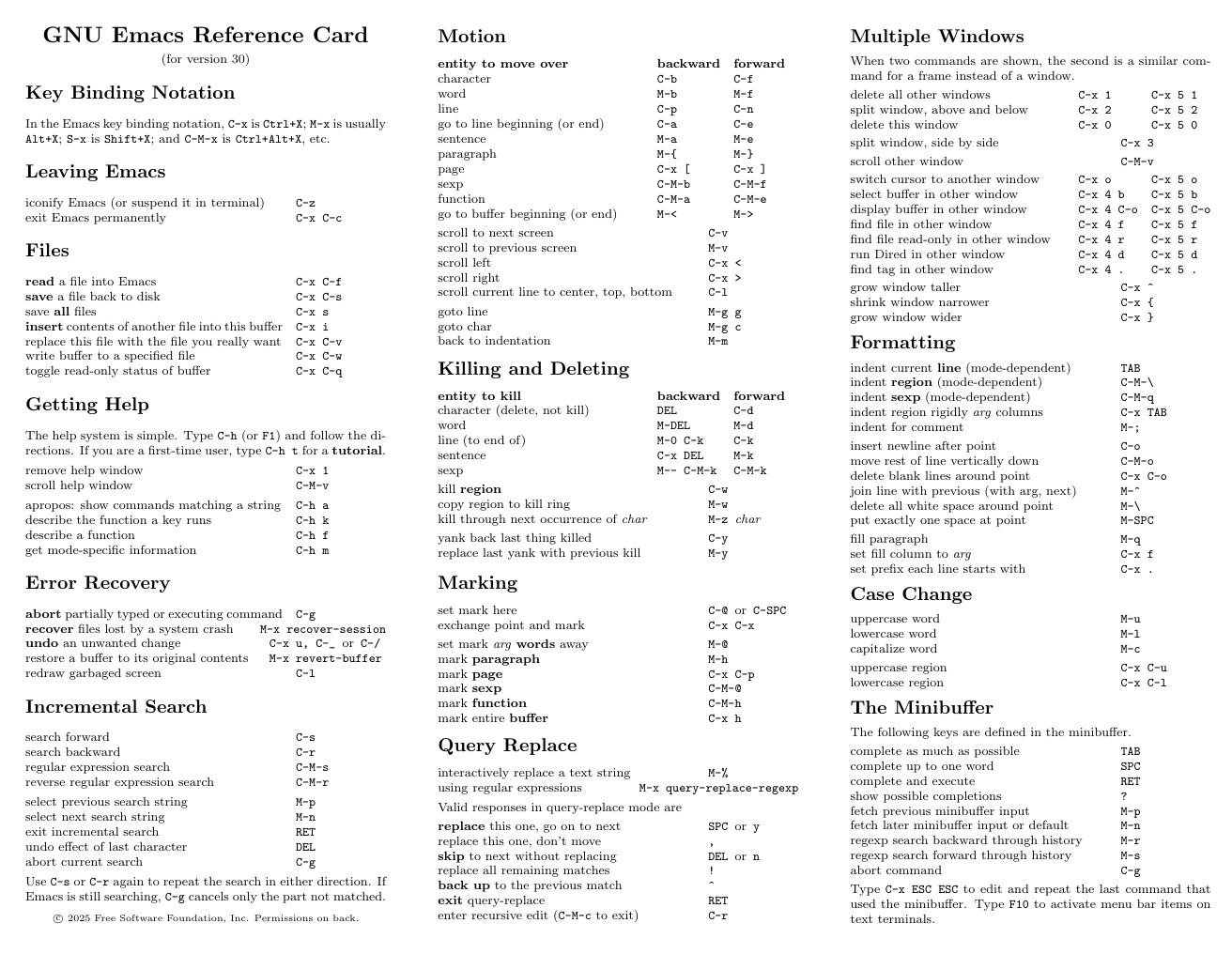
It’s beautiful (and GPLv3)!
So naturally I wanted to make my own. However, my initial concern was that if I updated my Neovim config, I’d have to remember to update the card too, essentially duplicating my workload. And programmers famously always remember to update the docs after updating the code…
I’d thought about this before, back when my config was vimscript. And tabled it posthaste, because, no, I don’t exactly want to write some flaky parser that’s external to the config.
However, I have a
nix-based config now. Which provides
builtins.toJSON and is declarative. If only there were a nice typesetting tool
that accepted JSON data as input…
And there is! Typst, a modern (and open source) typsetting system1, can read data from JSON files. So if I use JSON derived from my Nix configs, the generated reference card will always be in sync! Ok, let’s try it out.
1. Defining the keymaps in Nix
I use nvf, a neovim config framework, to build my personal neovim. But all that really matters is that, for keymaps, it needs a List of AttrSets (short for Attribute Sets, which are a collection of name-value pairs called attributes), which make up the keymaps2.
“If you are familiar with JSON, imagine the Nix language as JSON with functions.”
— nix.dev’s Nix language basics
# ./modules/keymaps.nix
{...}: {
  vim.keymaps = [
    # An AttrSet.
    {
      key = "<Leader>m";
      mode = "n";
      silent = true;
      action = ":make<CR>";
    }
  ];
}
A Note about Nix Files
If you’re totally unfamiliar, Nix is a functional programming language. Each file has a set of inputs and an output. In the above file,
{...}allows any unspecified amount of inputs. The remaining code inside of the{ }are config options that are being specified.For further reading, check out Nix language basics from nix.dev.
Now, I have a lot of keymaps to add, some of them use lua, and I don’t necessarily want all of them on the card. So creating a few convenience functions makes sense here.
# ./modules/keymaps.nix
{...}: let
    # 1. the main function for making Keymaps
    mkKm = mode: key: action: desc: {
      inherit mode key action desc;
      silent = true;
      noremap = true;
      hidden = desc == ""; # don't show up on the cheatsheet
    };

    # 2. The same thing, but for Lua-based keymaps
    mkKmLua = mode: key: action: desc:
      (mkKm mode key action desc) // {lua = true;};

    # 3. For documenting existing keymaps only. These will get filtered
    # out of the actual config.
    mkDocKm = mode: key: desc: {
      inherit mode key desc;
      action = "";
      silent = true;
      noremap = true;
      hidden = false;
      docOnly = true;
    };
# 2.
in {
  # ...
}
One tiny problem though: if I want to break the card into separate sections, I need to group related keymaps. But as I just mentioned, nvf expects a single list.
What I settled on was defining the commands as a AttrSet, and doing some
processing in the let ... in to collapse the attribute values into a single
list for nvf.
# ./modules/keymaps.nix
{...}: let
  # ...

  sections = {
    "08-Folds" = [
      (mkKm "n" "<Leader>z" "za" "Toggle fold under cursor")
      (mkKm "n" "]z" "zj" "Next fold")
      (mkKm "n" "[z" "zk" "Previous fold")
    ];
  };

  # 1. flatten keymaps into a single list
  allKeymaps = lib.concatLists (lib.attrValues sections);

  # 2. filter out the doc-only keymaps
  runtimeKeymaps = builtins.filter (km: !(km.docOnly or false)) allKeymaps;
in {
  #. 3. Expose the keymap sections in the nvim nix config
  vim.keymapData = sections;

  # 4. set the keymaps for the config
  vim.keymaps = runtimeKeymaps;
}
2. Exporting the keymaps to JSON
In the root flake.nix is where the keymapData will get exposed as a package.
The packages key expects an AttrSet of derivations (essentially, built
packages):
A Note about Flakes
Although
flake.nixfiles have a.nixextension, they’re not standard.nixfiles. They expect a particular schema, with four top-level attributes:
# ./flake.nix
{
  description = "My Super Awesome Flake";
  outputs = {
    packages = { ... }; # <-- define our packages here
  };
  inputs = { ... };
  nixConfig = { ... }; # optional
};
For a more on flakes, check out
the NixOS & Flakes Book. For now,
I’m going to expose keymap-data as a JSON object, with another helper called
pkgs.writeText.
The full qualified key in this case is config.vim.keymapData.
# ./flake.nix
{
  outputs.packages = let
    # this function comes from nvf and builds a custom nvim config
    # from the supplied nix files
    nvimConfig = nvf.lib.neovimConfiguration {
    	modules = [ ./keymaps.nix ];
    };
  in {
    keymap-data =
        pkgs.writeText "keymaps.json"
        (builtins.toJSON nvimConfig.config.vim.keymapData);
  };
}
At this point, I can run nix build '.#keymap-data'. The output, as expected,
is a blob of JSON.
3. Making the Typst Template
Now that the data exists, I need to tell Typst and load it.
// ./keymap-card/keymap-card.typ

#let data-path = sys.inputs.at("data", default: "keymaps.json")
#let data = json(data-path)
Typst is also very functional, so it pairs nicely with Nix. All that’s left is
iterating over the keys in keymap-data and calling a function that displays a
section.
// ./keymap-card/keymap-card.typ

// define the display function for sections
#let render-section(name, keymaps) = {
  let visible = keymaps.filter(km => not km.at("hidden", default: false))
  if visible.len() == 0 { return }

  block(breakable: false, below: 10pt, width: 100%)[
    // ... rendering logic ...
  ]
}

#for (i, name) in section-names.enumerate() {
  render-section(name, data.at(name))
}
I won’t bore you, but if you want to see it, the full Typst template is here.
4. Building the Reference Card
So we have the data, and we have the Typst template, now we need to run it and package the output. This process (taking a set of inputs to make a deterministic output) is called a derivation in Nix.
Nix does have a derivation function, but it’s a bit low level. Instead, for
day to day builds,
nixpkgs provides an environment (stdenv)
and a function: mkDerivation. stdenv has the standard
./configure; make; make install tooling, which isn’t necessary here, so I used
stdenvNoCC instead.
The build itself gets
called in multiple phases.
All that’s needed here is the buildPhase and installPhase attributes. Those
determine how typst compile gets called and where the final output is placed.
# ./keymap-card/default.nix
# Making a folder with a `default.nix` is standard for a derivation
# that has multiple files, such as our Typst template.
{
  pkgs,
  lib,
  keymap-data,
  ...
}:
# Inputs: keymap-data.json, keymap-card.typ
# Outputs: keymap-card.pdf
pkgs.stdenvNoCC.mkDerivation {
  pname = "keymap-card";
  version = "0.1";

  # this is a local build, but nixpkgs provides `fetchFromGitHub`, etc
  src = ./.;

  # we need Typst for the build, but not for the runtime
  nativeBuildInputs = [pkgs.typst];

  buildPhase = ''
    runHook preBuild

    typst compile \
    	--root /
	--input data=${keymap-data} \
      ./keymap-card.typ \
      keymap-card.pdf

    runHook postBuild
  '';

  installPhase = ''
    runHook preInstall

    # by default, outputs is set to ["out"], and each gets exposed as
    # an environment variable in the build. it's the directory after the
    # shasum is calculated for the output, and looks similar to
    # /nix/store/14zfv4mx001hmvh2cgag4rlpdgqs50vw-keymap-card-0.1

    install -Dm644 keymap-card.png "$out/keymap-card.png"

    runHook postInstall
  '';

  meta = {
    license = [lib.licenses.agpl3Only];
  };
}
So that builds it, but how does keymap-data get there? Well, since it was
exposed as a package earlier, it can now be passed to this package,
keymap-card. Back to flake.nix:
# ./flake.nix
{
  outputs.packages = let
    # this function comes from nvf and builds a custom nvim config
    # from the supplied nix files
    nvimConfig = nvf.lib.neovimConfiguration {
    	modules = [ ./keymaps.nix ];
    };
  in rec {
    # the built JSON package from earlier
    keymap-data =
        pkgs.writeText "keymaps.json"
        (builtins.toJSON nvimConfig.config.vim.keymapData);

    # the new keymap-card, compiled Typst output package
    keymap-card = pkgs.callPackage ./keymap-card {
        # here, keymap-data is passed to ./keymap-card/default.nix
        inherit pkgs keymap-data nvimConfig;
     };
  };
}
With keymap-card now exposed, it’s possible to run `nix build ‘.#keymap-card’.
$ nix build '.#keymap-card'$ ls -1 ./result
keymap-card.pdf5. Final Output
And the result, finally…!
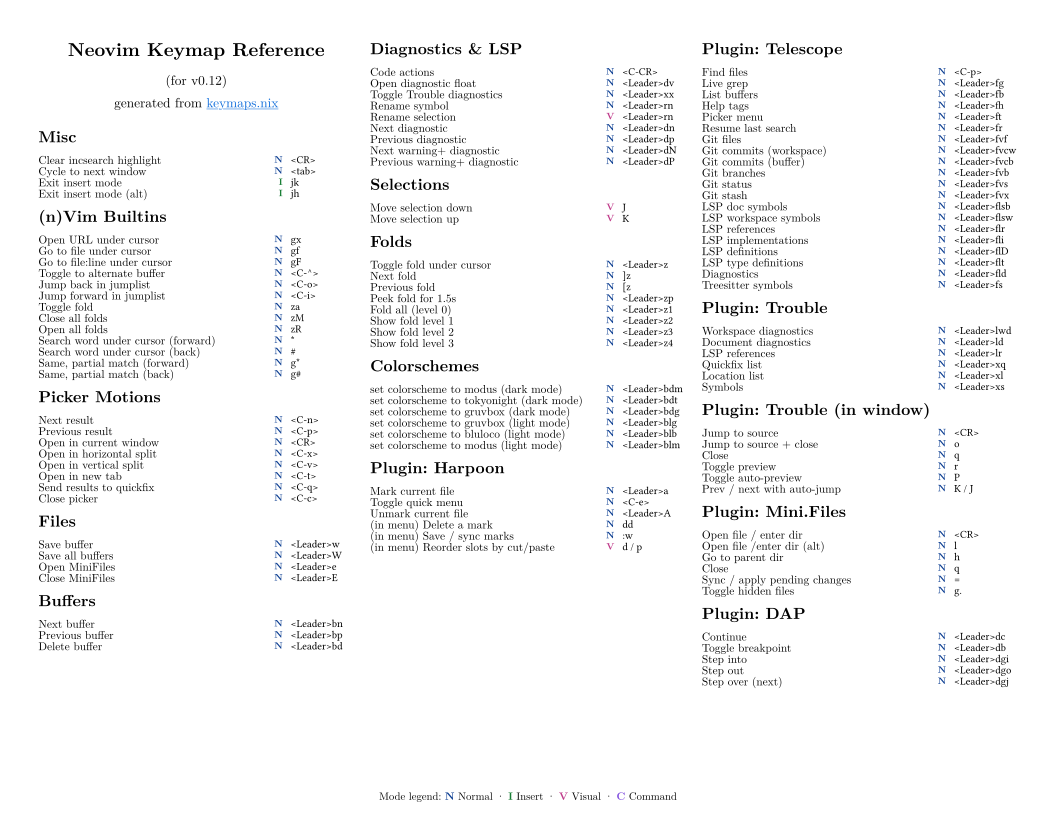
The template definitely needs to be fine-tuned. But I find this is a good stopping point for now. Emacs users will no doubt point out that the nature of elisp lends itself to this sort of thing. And they’re right!
Vimscript was painful. Neovim’s lua is a good step forward, but I’m glad to be managing it with Nix instead. At least for now, until I migrate to Emacs…
For anyone curious,
here’s the repo which has keymap-card and my neovim config,
under `modules.
-
LaTeX will always hold a special spot in my heart, but it’s -really- cumbersome. I’m not an academic, and I don’t have any particular need for it. ↩︎
-
See nvf’s
vim.keymapsoption. ↩︎